
Some of you will have seen my 24 Ways posters before: Windows shortcuts, AI tools, formative assessment. This series goes deeper.
Pedagogy First is six resources grounded in the cognitive science of teaching and learning, each one built around what the research actually says rather than what’s currently trending. I’ve spent the better part of my career saying the same thing: pedagogy first, technology second. Not because technology doesn’t matter. It does, significantly. But because the most powerful thing any teacher can do is understand how learning actually works, and then make decisions in service of that.
That belief is behind everything I make. It’s also behind this.
The Series
Every Wednesday for the next six weeks, a new infographic drops. When all six are complete, I’ll compile them into a free PDF guide, available to everyone. No paywall. No sign-up.
The full series covers:
- Retrieval Practice and Memory
- Formative Assessment
- Feedback
- Classroom Questioning and Discussion
- Explanations and Modelling
- Metacognition and Self-Regulation
This Week: Retrieval Practice and Memory
Retrieval practice has some of the strongest evidence bases in education. This infographic is my attempt to make that research accessible, visible in one place and as useful as possible.
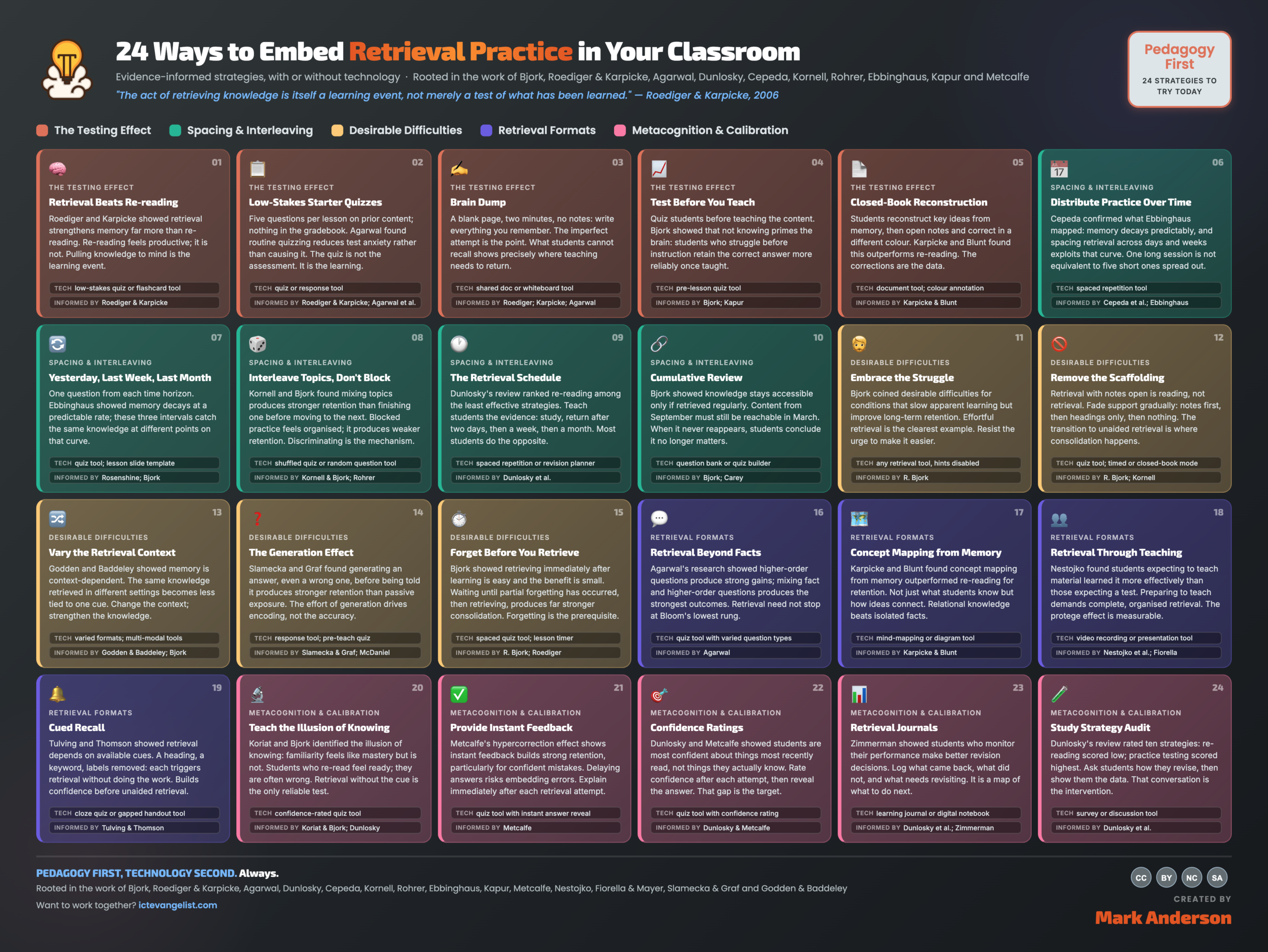
This first infographic maps out 24 strategies for embedding retrieval practice in your classroom, each one grounded in cognitive science. The research behind it is serious. Roediger and Karpicke on the testing effect. Ebbinghaus on the forgetting curve. Björk on desirable difficulties. Dunlosky’s landmark review of revision strategies, which found that the things most students rely on, re-reading, highlighting, and summarising, are among the least effective methods known. Agarwal on retrieval beyond factual recall. Metcalfe on what happens when confident students get things wrong.
Twenty-four strategies. Five categories. One principle running through all of it: what works.
A Note on How This Was Built
I tried really hard to synthesise all I could on the topic. I absolutely used AI to help me with this. From Perplexity to Claude (incidentally, it was Claude that helped make the graphic, albeit I took the HTML file it generated once it was done and improved the text myself), I used AI to help me curate, synthesise and act as a thinking partner whilst fleshing out ideas. At no point, though, did the AI tool write everything for me. Where I’ve placed things, I used what was my best thinking; albeit there were some difficult placements. For instance, with the hypercorrection effect, it sits in the metacognition and calibration section rather than the testing effect section. It could go in either, but I thought, because the underlying thinking behind it is about confidence calibration, not the act of testing, that was the best place for it. Am I right? Hopefully. Hopefully, you’ll scrutinise it as much as I have and work it out for yourselves too. I like to think it’s as rigorous as anything else I’ve seen.
Download it
The infographic is embedded above and free to download, print, and share with your colleagues, being mindful of my Creative Commons license and my own IP in making it. If you use it with your department or in a training session, I’d love to know how it goes.
The next infographic, Formative Assessment, drops tomorrow.





