In education, when it comes to your ecosystem, the productivity suite and core tools that frame most of your use, you normally sit in one of two camps. For the most part, you can often undertake similar activities when it comes to things like word processing, presentations, working with numbers etc. But in recent times, one of those two seem to have pulled away a bit; not just in terms of the opportunities provided from their AI tools, but in how they link so closely to education.
On today’s Appvent reveal, long-suffering, coffee-sharing and all-around pragmatist with children’s outcomes at the front of her mind, friend and lover of Lego, Emma Darcy shares about the brilliant opportunities available to you in Gemini from Google.
Gemini is a very powerful AI tool that offers immense potential for everyone working in education, from teachers in the classroom to those in support and admin roles. It is also one of the fastest-evolving tools out there and the biggest challenge with writing this “App of the Day” summary has been keeping up with the latest features! As with all AI tools, Gemini can be a fantastic assistant, but you must still cast your professional eye over the work it helps you produce.
Tool of the Day
At the heart of the platform is the Gemini 3 Pro model (released on 18th November) which is far better at complex thinking and reasoning than earlier generations. This means it can handle multi-step requests like generating a fully differentiated lesson sequence or helping you draft a school policy with much more accuracy, nuance and contextual understanding than before.
Crucially, within Gemini, you can create custom tools called ‘Gems’. These are essentially re-usable, personalised AI assistants that you build just once to automate your most common, repetitive tasks, saving you time every day.
To tackle visual resources, the platform uses Nano Banana Pro. This visual tool helps to sort out the common issue of poor text in AI images, letting you generate accurate, high-quality educational visuals (think technical diagrams, data charts, and posters) with clear, legible text embedded in the image (again, always check for accuracy!)
Educational Benefits
For classroom teachers, one of the biggest wins with Gemini is the ability to handle content differentiation quickly and effectively. You can take a core resource and instantly adapt it into multiple versions to suit pupils with SEN, or translate materials for EAL pupils. When it comes to assessment and planning, Gemini can generate a varied bank of questions for use as formative and summative assessment or build detailed marking criteria (or rubrics) that are fully aligned with the National Curriculum or even your own Key Stage planning. If you already use Google Classroom in your school, Gemini is now directly embedded, which can really help cut down preparation time.
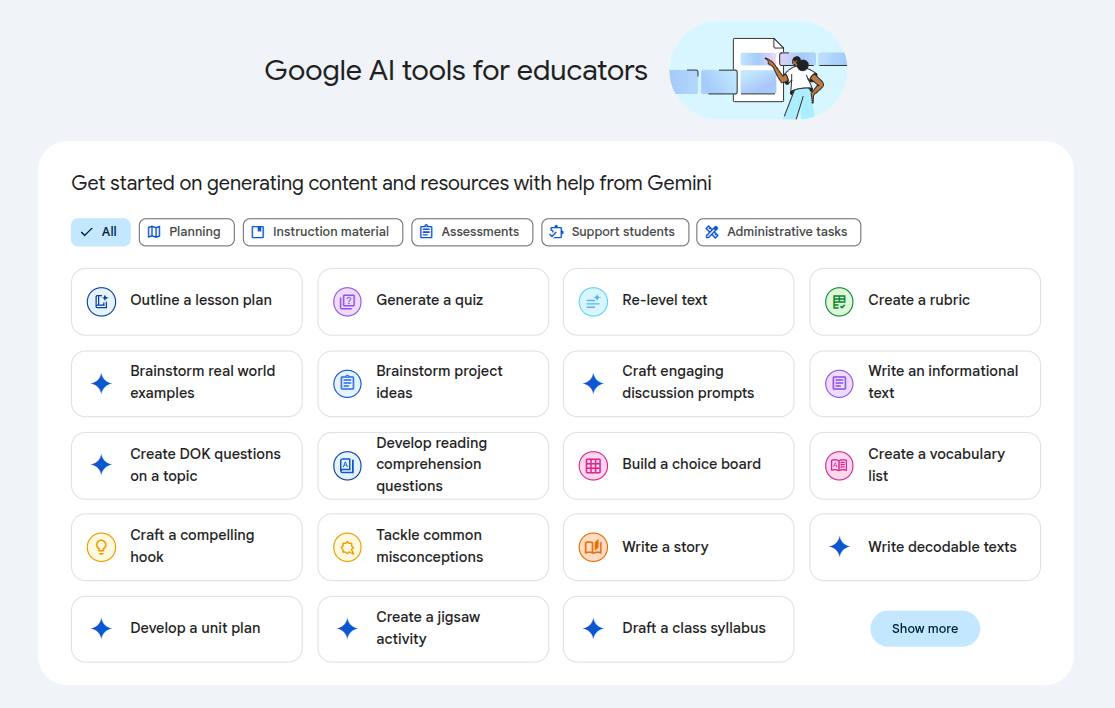
The Google AI tools dashboard within Google Classroom
Practical Application
The potential of Gemini stretches into every corner of the school with far too many usage cases to include here! Teachers can use it to develop creative pedagogy, such as drafting unique project-based tasks, generating relevant case studies to introduce a topic, or predicting common misunderstandings pupils might have.
A fantastic, ready-made Gem is Storybook. Teachers can use Storybook to instantly generate fully illustrated, ten-page books tailored to a specific topic, vocabulary list, or emotional need (e.g., a story about resilience) for younger learners.
For administrative and support teams, Gemini can be really helpful for professional communication and document handling. In a school or trust education domain, the data provided is not used to train the model – an essential consideration for compliance with national policies and guidance.

A Storybook created to support young children who have a fear of bees
Considerations and Tips
To get the best out of Gemini, you need to think critically about how you use it.
- Always check: Treat everything Gemini generates as a first draft. It’s your professional responsibility to check the facts, ensure the content is appropriate, and refine it to match your school’s policies and practices.
- Be specific in your prompts: The more detail you give, the better the result! Tell Gemini exactly who the resource is for (e.g., Year 9 Science, developing literacy), what the specific learning objectives are, and what kind of tone or format you need.
- Data compliance is key: Before using Gemini, particularly the text input features, please make sure you follow your school or trust’s guidelines regarding UK GDPR and data privacy. Never input any pupil-identifying or confidential information.
Conclusion
Gemini is a hugely powerful tool which, when used carefully and aligned with school processes and practices, can generate real benefits for school staff and learners. Yes, it can reduce the time it takes to complete tasks, but equally importantly, when used with critical thinking and innovation, it can create some truly transformational education resources.
My personal thanks
Thanks so much to Emma for her kind contribution to the #24DaysOfAI Appvent calendar. If you’d like to connect with her on LinkedIn, she’s a great person to have as part of your professional learning network. She also contributed a brilliant (and helpful!) case study on how to manage learning with technology in The EdTech Playbook, which you can find on Amazon and all good websites.