One of the most joyful aspects of working with young learners is watching their imagination take shape in unexpected ways. Whether sketching characters, inventing creatures or building stories from the world around them, children show us daily how naturally they think in three dimensions. As immersive tools develop, there are growing opportunities to extend that creativity into digital spaces in ways that feel meaningful rather than gimmicky.
Today’s Appvent entry comes from Lyndsey Stuttard, an international educator, Apple Distinguished Educator and long time advocate for creative, purposeful use of augmented reality. She introduces Luma Genie, a text to 3D generation tool that allows teachers to transform pupil ideas into viewable, manipulable 3D models. Used thoughtfully by a teacher (the platform is 18+), it offers a powerful bridge between children’s early sketches and immersive AR experiences that can enrich storytelling, language and imaginative play.
AI Tool of the Day: Luma Genie
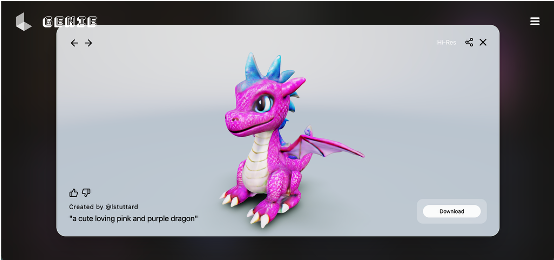
Luma Genie is a text-to-3D model generator that creates detailed objects and characters from a written description. Teachers enter a prompt describing the character or design they want to generate, and the system produces several options. These vary in accuracy depending on how clearly the prompt is framed, so some refinement is often needed. That iterative process mirrors the way we encourage young learners to review, adjust and improve their ideas.
Because the platform is for ages 18+, teachers must manage the entire process. You remain in control of the account, the prompt writing and what is shared with your class, ensuring pupils only engage with appropriate, purposeful outputs.
Educational Impact
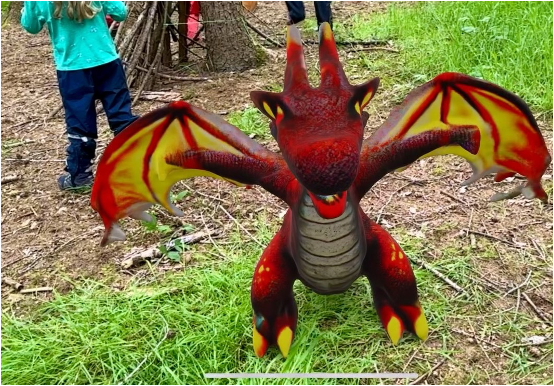
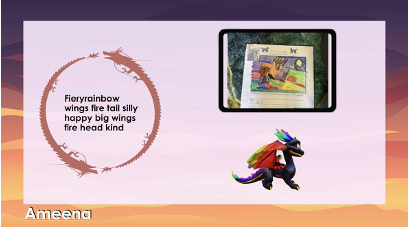
I have used Luma Genie to strengthen cross-curricular storytelling in the Early Years, where imaginative play, language and creativity are deeply intertwined. Our project begins with an invented character — often a dragon — which pupils sketch and describe. They work together to identify features such as colours, shapes, textures and expressions. I take their descriptive language and use it to generate a model in Luma Genie, discussing what worked well and what we may need to refine.
The impact is significant.
First, children see their ideas come to life. Their pencil sketches become detailed 3D models they can explore from every angle. That sense of recognition and ownership matters. It validates their thinking and encourages them to express their ideas more confidently.
Second, this process strengthens language development. When the model is close but not quite right, children refine their vocabulary and revisit their descriptions. They learn that precision shapes outcomes, and that words have power in creative design.
Third, the workflow leads naturally into immersive storytelling. Once the final models are downloaded, converted and shared to our iPads, pupils take them into our Forest School environment to create videos that merge their characters with real-world settings. They narrate their stories, sequence events and work collaboratively to bring their ideas to life. The technology does not replace imaginative work; it amplifies it.
Practical Application
Setting up an account is quick and free, with Apple and Google sign-in options available. Once logged in, teachers can generate multiple models and save a library of creations to revisit or download later.
Models export as GLB files, which need to be converted to USDZ to view in augmented reality on iPads. Any reputable online converter handles this step, and once converted, the files can be airdropped or shared to pupil devices.
To view AR content, pupils need iPads (6th generation or newer). Older devices can still display the 3D model, but will not support AR placement.
Teachers guide the entire workflow: generating models, converting files and sharing content safely with pupils.
Considerations and Tips
The quality of a model depends on the clarity of the prompt. Encourage children to use descriptive vocabulary and model the language that will help them express their ideas more precisely. Treat prompt refinement as part of the learning, not a correction.
Expect to generate a few variations before landing on the best fit. This mirrors a designer’s iterative process and gives pupils valuable insight into how ideas evolve.
Check device compatibility ahead of time. Ensuring pupils have AR-capable iPads will make the final stage of the project smoother and more engaging.
Most importantly, give pupils space to explore, narrate and play once the models are ready. The real value lies in how they use the 3D content to deepen storytelling, expressive language and collaborative learning.
Conclusion
Luma Genie provides a thoughtful and engaging way for children to see their ideas transformed into 3D models that they can explore and place into their environment through augmented reality. When used intentionally by a teacher, it enriches storytelling, language and creativity while giving pupils the joy of watching their ideas come alive in new ways.
My Thanks
Thanks to Lyndsey for her contribution to the Appvent Calendar 2025! You can connect with Lyndsey on LinkedIn here.
Join me tomorrow for Day 10 of the Appvent Calendar as we continue exploring tools that support purposeful and imaginative learning.
Please do comment, like, repost and share so your PLN can learn too ☺️