Most educators juggle a dozen different tools daily. One for creating presentations, another for editing images, a third for removing backgrounds, something else for generating worksheets. Add in the copyright minefield of finding classroom-appropriate images and you’ve lost hours before you’ve even started teaching. Then there’s the accessibility challenge – that perfect resource you’ve created is useless if half your class can’t access it in their home language.
Today’s appvent reveal brings us a tool that’s been quietly revolutionising how educators create and share resources. While it markets itself as a design platform, savvy teachers have discovered it’s become something far more powerful – a complete classroom creation suite that solves the fragmentation problem whilst demolishing the barriers between creation and accessibility. Today’s tool, recommended by Ashley Bryant (connect with Ashley here) is the educator’s Swiss Army knife: Canva for Education.
Canva sells itself as a design suite, but it truly is so much more. With tools comparable to other major productivity platforms, Canva can help you create amazing slides, classroom display resources, documents, data sheets, and more! Even with all that power, throw in the Canva AI tools and you could easily spend your whole day working inside the app.
Educational Benefits
This tool really does have it all for both teachers and students, and it is all FREE.
A major advantage of the education license is access to Canva’s massive library of copyright-free media. No longer are you going to spend hours looking for just the right image of the waxing moon or a highland cow. Teachers and students can use millions of premium images, videos, GIFs, graphics, and audio tracks without worrying about licensing fees or copyright strikes.
Another big benefit to using the education license of Canva is the simplified workflows between students and teachers. Canva can be added as an API integration within many major Learning Management Systems (LMS), such as Canvas, Schoology, and Google Classroom. This makes it incredibly easy for students to share their work directly with educators and submit assignments without ever having to leave the platform.
The AI is where the “magic” happens, though. Of course, it has all the basic AI support like translation, text rewriting, and text transformation, but it is the extras where it shines; especially for diverse classrooms.
Practical Application
I could go on for days about the million different tools Canva offers and how they can be used to support learning communities but two of my favorite are:
Grab Text: We all want to have resources in our classroom community that support learning—from calendars and alphabet posters in a Kindergarten classroom to posters explaining photosynthesis in High School. However, we often have students who struggle to access these resources, leaving them feeling frustrated. With Grab Text, you can easily change fonts and add additional languages to classroom resources while ensuring the changes look like they were there from the beginning. This fosters a true sense of belonging for those students.
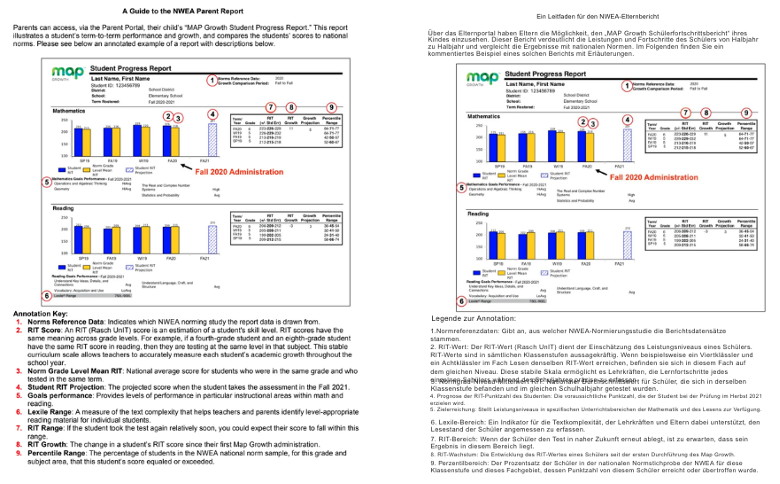
This tool can also be incredibly powerful for families who might not speak English. Sending home newsletters, reports, and other documents in languages they cannot access does not help to build community. With Grab Text, you can quickly take documents like NWEA MAP test reports and translate them into languages that are accessible to your school community.
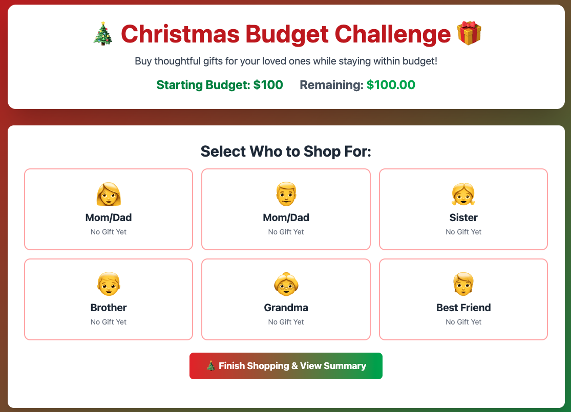
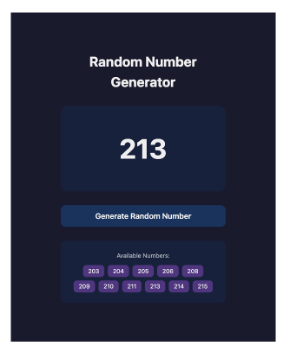
Canva Code: This tool is a powerhouse! While I use this tool almost every day, I continue to find new ways to use it. Beyond just creating visuals, it offers the ability to collect data from user responses, opening up a world of possibilities. There are two distinct ways to use Canva Code:
- As a stand-alone tool that can be published as a website. This is the key differentiator when it comes to “vibe coding” compared to other big tools. You can create engaging student resources like educational games and interactive exit tickets, or streamline administrative tasks with custom sign-up sheets and conference schedulers. With other LLM tools, you often have to find a 3rd party host, but Canva does BOTH!
- Directly in a project you have created. Need a random name picker or number selector? Code it right there and then!
In a day and age when there is a website or online tool for every different task (where you often have to give away personal data to access them), this tool really does make tasks a one-stop shop.
Considerations and Tips
Canva is free for both individual educators and schools.
As with any AI tool, please ensure the following:
- Confirm privacy and data‑security practices align with your school’s or district’s policies.
- All tools still require educator oversight, ensuring you review anything created or flagged by the tool for accuracy.
While Canva’s AI tools are incredibly powerful, the responses and creations are only as good as the details and resources you provide. Take time to test, trial and create to ensure you get the best out of Canva.
Canva offers PD and certificate programs to increase AI literacy and effective tool use. To learn more visit their PD website.
Conclusion
We know AI is part of education’s future, but knowing where to start can be overwhelming when a new AI tool seems to appear every day. Canva can be the one-stop shop for image generation, presentations, and more.