Day 18 of the #24DaysOfAI Appvent Calendar comes from guest contributor Kieran Buckley, who brings a brilliantly practical classroom lens to today’s tool. This one tackles a familiar teaching moment many of us recognise instantly and offers a simple, effective way to improve clarity, explanation and pupil understanding without adding workload.
We’ve all been there. You are in full flow explaining a concept, you grab the interactive whiteboard pen to sketch a quick diagram, and by the time you have finished your jittery, caffeine-fuelled attempt, half the class is more confused than when you started. Today’s tool attempts to fix that exact problem, taking you from board impressionist to impressive.
AI Tool of the Day: AutoDraw
Cost: 100 per cent free
Devices: Any web browser
Age range: EYFS to KS5 (and staff meetings too)
AutoDraw is a delightfully simple Google Experiment. You draw a rough scribble — a sun, arrow, volcano, fraction pie, anything at all — and machine learning instantly suggests clean, professional icons that match what you meant. Tap the right one, and your wobbly doodle is replaced in a split second.
It is fast, fun, and removes the “I can’t draw” excuse for teachers and pupils alike, as well as a fair bit of embarrassment from both camps.
The difference between a typical whiteboard sketch and an AutoDraw version created in the same amount of time is genuinely striking. The clarity shift is immediate.
Educational Benefits
AutoDraw brings a number of simple but powerful benefits into the classroom.
It saves huge amounts of time compared to hunting for images or wrestling with basic drawing tools. It allows for instant visual differentiation. If you forgot to prep a simplified forces diagram or water cycle graphic the night before, you can create it live while the class watches.
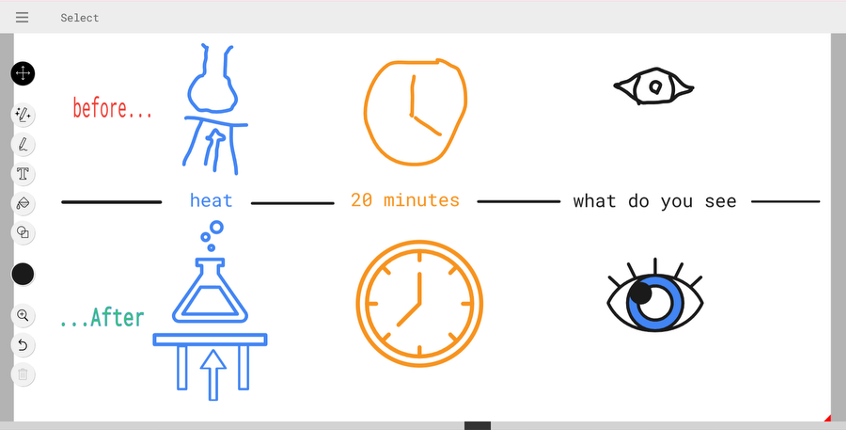
It boosts pupil confidence, as even the most reluctant artists can produce visuals they are happy to share. Perhaps most importantly, that moment when a terrible sketch becomes something recognisable keeps attention exactly where it should be, on the learning.
Practical Application
Most interactive whiteboards already translate pen strokes into mouse movements. AutoDraw simply makes those strokes more useful.
In my classroom it has become a lesson staple and the pupils love it. I regularly use it for live science diagrams such as cells, circuits, forces and food chains, often created in under 30 seconds. It is brilliant for quick mind maps and brainstorms, replacing my usual scrawls with tidy, readable icons. Pupils also use it to create labelled diagrams, storyboards and symmetrical patterns, supporting exploration of shape and space with confidence.
The icon library is particularly strong for science and technology symbols, and new drawings are promised to be added regularly. Built in text, colour fill and simple shapes mean it has everything needed for clear board work or pupil-created resources.
Seeing a pupil’s rough sketch instantly transformed into something recognisable is often a lightbulb moment in itself.
Considerations and Tips
AutoDraw excels at icons and diagrams, which is exactly what teachers tend to draw most often. The interface is intuitive, with a very low learning curve.
Drawing slowly and simply at first produces the best suggestions. A deliberate squiggle beats a frantic one. You can turn the AI suggestions off completely if you want pure free drawing.
No login is required, and nothing is saved unless you download it, which makes it well-suited to school data policies and governance requirements. It also works brilliantly on tablets and other small touchscreen devices, whether using touch or a stylus.
English, art and humanities teachers may not yet get the same mileage from it as STEM colleagues, but updates are reportedly on the way.
You can also browse the doodles available before you start, which can turn into a classroom game of who can get closest to the target image on their first attempt.
Conclusion
AutoDraw is a deceptively simple tool that solves a very real classroom problem. By turning rough sketches into clear, recognisable visuals in seconds, it supports explanation, reduces cognitive load and helps pupils focus on the learning rather than decoding the drawing. It removes a barrier many teachers quietly work around every day and replaces it with something fast, intuitive and genuinely useful.
If you have ever hesitated before picking up the board pen, this is one to try.
Thanks so much to Kieran for his contribution to today’s calendar. It just goes to prove, the best tools aren’t always the big, flashy, expensive ones, but those that genuinely help with the day-to-day, routine and pain points every teacher feels. Thanks, Kieran. You can connect with Kieran on LinkedIn here.
Join me tomorrow for Day 19 of the Appvent Calendar as we continue exploring practical tools that make teaching just that little bit easier.
Please do comment, like, repost and share so your PLN can learn too ☺️