
Good questions sit at the heart of effective teaching because they help us check understanding, surface misconceptions and build retrieval into routines. Yet designing them well and doing so consistently is demanding. That workload challenge is exactly why I wanted to include QuestionWell in this year’s Appvent Calendar.

AI Tool of the Day: QuestionWell
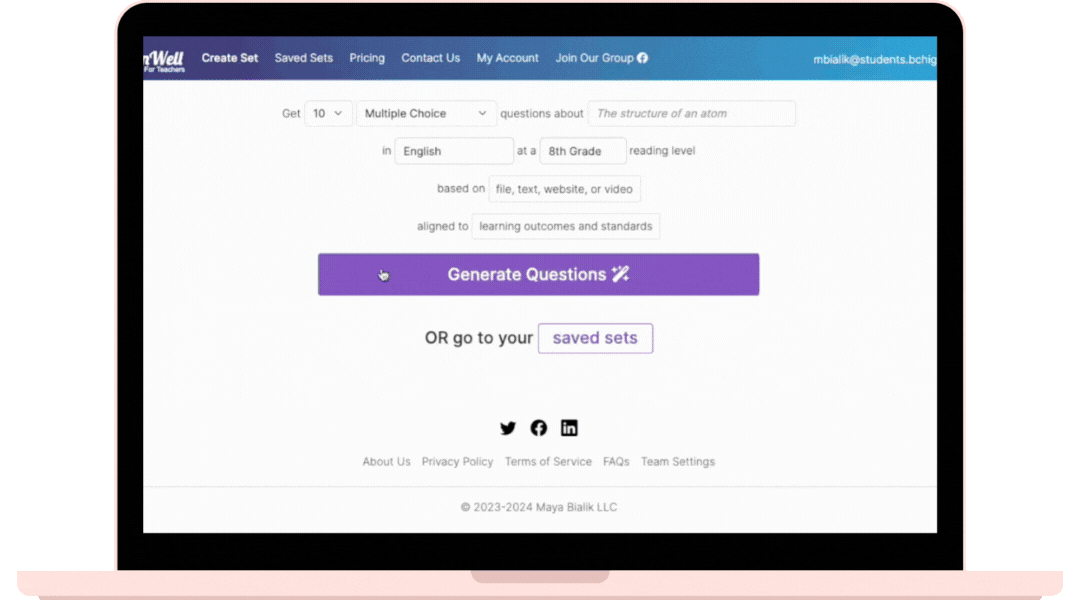
QuestionWell focuses on one thing and does it well. It generates question sets from any text or topic and gives you a broad range of question types to work with. You stay fully in control. You can edit, delete, reorder and refine until the questions match your curriculum intent. The tool also exports directly to platforms teachers already use, which makes it both easy to use and easy to adopt.
It is a thoughtful piece of work created by Maya Bialik, a former teacher and learning science researcher. Her background shows in how the tool supports teacher decision-making rather than trying to replace it. It keeps the important thinking that needs to take place because you know your subject, your class, and your context with you.
Educational Impact
QuestionWell is useful because it fits naturally into your already established routines, it just makes it easier to well…. question well!
It makes retrieval practice easier to plan. It supports you with hinge questions and quick CFUs. It helps you and your teams build shared banks of questions, which helps with consistency across a phase or subject. It is also valuable for those new to teaching who benefit from seeing a range of question types modelled clearly.
The tool also helps with the quality of questions. Generating strong distractors is difficult yet essential for meaningful multiple-choice tasks. Having these created for you and then refining them saves time and improves the clarity of the assessment. It also supports more structured professional discussions about misconceptions and cognitive demand.
Practical Application
Using QuestionWell is straightforward. You enter your topic or paste in a text, and the tool generates a full set of questions. You then select the ones that suit your purpose and adapt them where needed. Once ready, you can export to your quiz platform of choice or copy the questions directly into your lesson materials.
This workflow supports a wide range of uses:
- retrieval warm ups
- exit tickets
- intervention sessions
- revision homework
- departmental question banks
- trainee teacher support
- subject knowledge development
The key is that you still make the decisions. The tool speeds up the drafting so you can focus on purpose, clarity and alignment.
Considerations and Tips
- Keep your inputs precise. The clearer the text or topic you provide, the better the questions will be.
- Review the outputs carefully. Treat them as drafts that give you a starting point rather than a finished set.
- Use filters to balance recall, comprehension and challenge.
- Build a shared library across your department. QuestionWell is strongest when used collaboratively.
Conclusion
QuestionWell offers you practical and efficient ways to reduce workload while improving the quality and range of questions used by you in lessons, mindful of the cognitive science approaches known to help with learning. By supporting retrieval, formative assessment and shared professional dialogue, it brings efficiency to an area that often absorbs more time than we realise.
Join me tomorrow for Day 13 of the Appvent Calendar as we continue exploring tools that help teachers work with purpose and clarity.
Please do comment, like, repost and share so your PLN can learn too ☺️